
Three save-the-dates. Only one talks back.
Three reasonable ways to send a save-the-date. The third one tells you who's actually planning to come, months before invites go out.
Key Takeaways
- Three reasonable ways to send a save-the-date: a date in an email, an ICS attachment, or a one-click RSVP.
- A save-the-date built as a one-click RSVP returns intent data months before formal invites.
- A calendar invite sent this way can be updated later if the time or venue changes.
Everybody seems to do save-the-dates a little differently.
And, it’s a decision about how easy you want to make it for your guests to add your date to their calender.
But, there’s one way to make it easy and give yourself some intent data.
A date in an email and a prayer
You set the date, draft a short email, and hit send.
This does the job you asked of it: it tells your guests when.
For a casual dinner, this is fine!
For a summit you’re spending six figures on, you’re guessing/hoping.
The ICS attachment that feels like progress
The next step up is to attach a calendar file.
Most email clients render it as a preview at the top of the message with a one-click button.
Super easy for guests to get your event on their calendar. Two clicks and you’re done.
But the signal ends at the guest’s device. You have no idea who clicked, and your guest list looks exactly like it did before.
The improvement is for the guest, not for you.
One side note: some Outlook configurations treat an ICS attachment as a meeting invite and collapse your designed email into a flat calendar preview. If you’ve spent time on the design, this stings.
The version that gives you intent
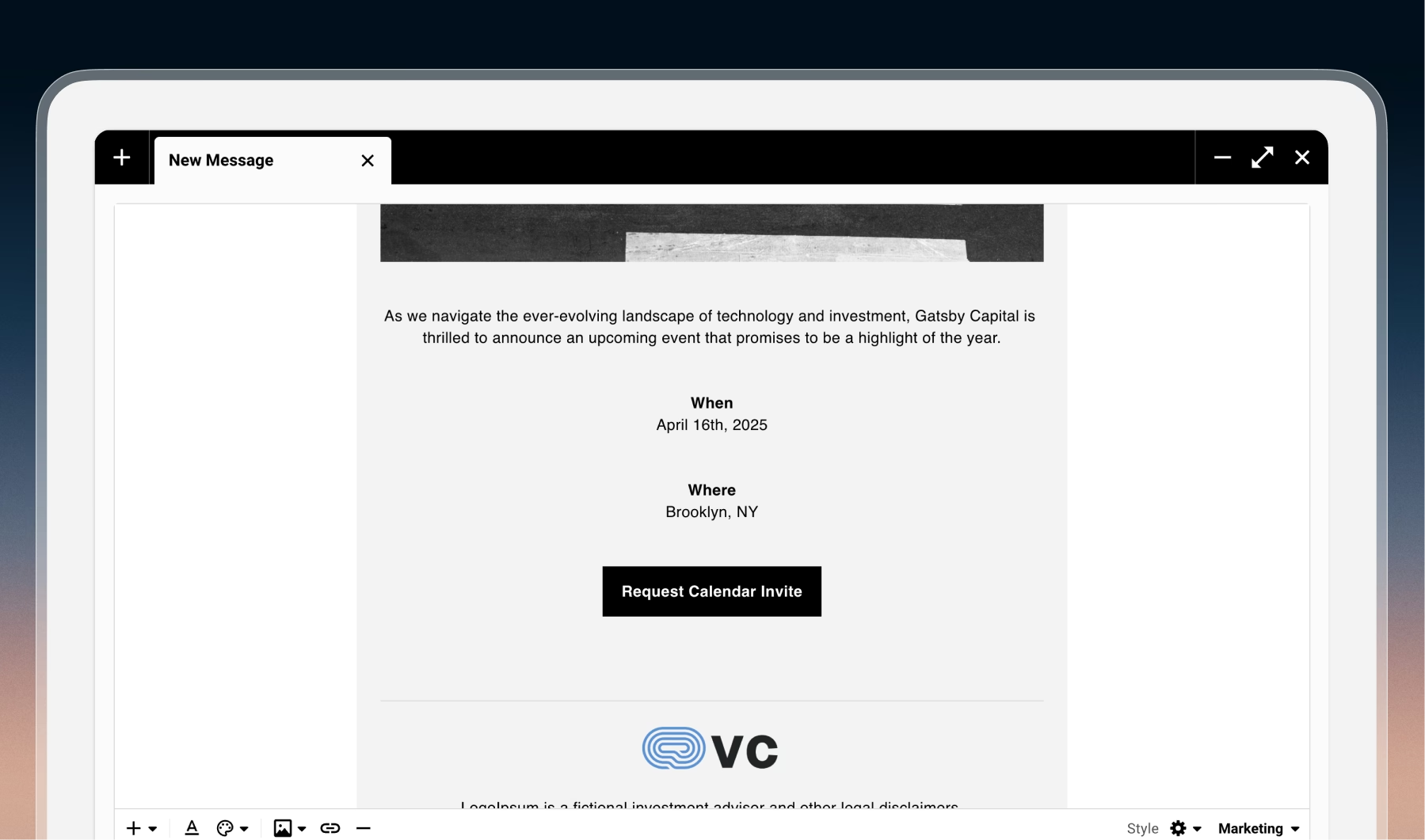
The third option is to make the save-the-date a one-click RSVP.
The guest clicks a link in your email, lands on a confirmation screen telling them you’ve got it, and gets a calendar invite a few seconds later.
On their side it feels almost identical to clicking an ICS button.
The difference is on your side.
The guest shows up on your list as accepted, months before your formal invite goes out.
The same click that put the date on their calendar told you they wanted to hold that date for you. And because the calendar invite came from Gatsby, you can update it later if the time or venue shifts.
This takes more setup than attaching an ICS, but that intent data helps you out during your planning phase.
What Save The Date intent data buys you
It changes several conversations at once.
Your speaker wants to know the room is real, and “sixty regulars already saved the date” lands differently than “we’re expecting about a hundred.”
Your venue wants an F&B number you’re no longer guessing at.
Your sponsor wants a count before they commit dollars.
Inside your own team, the wave-one invite debate gets shorter too. The people who wanted the calendar invite get the lighter touch. The people who didn’t are where you spend your personal time: a partner text, a handwritten note, whatever your firm’s version of the warm push is.
Two small choices that matter
The first is the button label. The instinct is “Add to Calendar.” But, I won’t recommend it.
Every other version of that button has trained guests to expect their calendar app to open, and that’s not what happens here. “Request calendar invite” is closer to the truth.
“Send me the calendar invite” is closer still.
The second is what you do when formal invites go out.
The instinct is to reuse the save-the-date event: rename it, reset RSVPs, send again. That kind of works, and it fails quietly.
Gatsby sends a confirmation email exactly once per guest per event, so guests who accept the second time get marked as accepted but don’t receive the calendar invite automatically again.
The fix is a separate event for the formal invite.
Each event keeps its own RSVP status, and you can see both columns side by side: who wanted to hold the date, and how they answered the real invite.
Yes, your guests end up with two calendar entries. The alternative is worse: a renamed save-the-date pushes a calendar update before your real invite lands, which reads as presumptuous.
Two entries cost a guest one delete.
Try it on one event
Pick an event at least three months out. Build a Gatsby event from the calendar-invite-only template, flip the invite link skips to survey toggle, and change the button to “Request calendar invite.”
Send yourself a test before anything goes to the list.
Click through the whole flow: the {rsvpLink} link in your email, the confirmation page, the calendar invite in your inbox.
When it reads right, send it for real.
The guests who click in the first week are the closest thing you’ll get to a list of who’s actually showing up.
Walk that number into your next venue conversation, and have it ready the next time a partner asks whether the room is real.
And if almost nobody clicks, that’s worth knowing too. A static email would never have told you.
Frequently Asked Questions
When is a save-the-date actually worth sending?
Most relationship-driven events more than six weeks out earn one. Annual meetings, summits, member retreats, dinners with traveling guests. Under three weeks of lead time? Your formal invite is the save-the-date. The smaller and more intimate the gathering, the less the intent data buys you in venue or sponsor conversations, which is the main payoff of the one-click RSVP approach.
Can the save-the-date email also include an ICS attachment as a fallback?
You can, but it muddies the experience. The one-click RSVP button and an ICS attachment in the same email give the guest two ways to add the event to their calendar. One returns data to you, the other does not. Most guests pick whichever shows up first, which is usually the ICS preview at the top. Better to commit to the RSVP approach and skip the ICS in this email.
Does an accepted RSVP on the save-the-date carry over to the formal-invite event?
No. The save-the-date and the formal invite are tracked separately on purpose, because they represent different commitments. If you link the two as parent and child, the guest list syncs but each event keeps its own RSVP status. You can show both RSVP columns side by side on the formal-invite event: who held the date, and how they responded to the real invite.
What happens if a guest requests the calendar invite and the event is later canceled or moved?
Send a campaign to everyone with an accepted RSVP on the save-the-date event before you delete the calendar entry. Pre-registration creates a small obligation, and a silent cancellation is the fastest way to lose trust with the guests most likely to show up. A short, direct message from the relationship owner works best.
The Shortlist Monthly
For teams whose guest list is a shortlist
Once a month we send the best of what we published, one email, from the team at Gatsby.